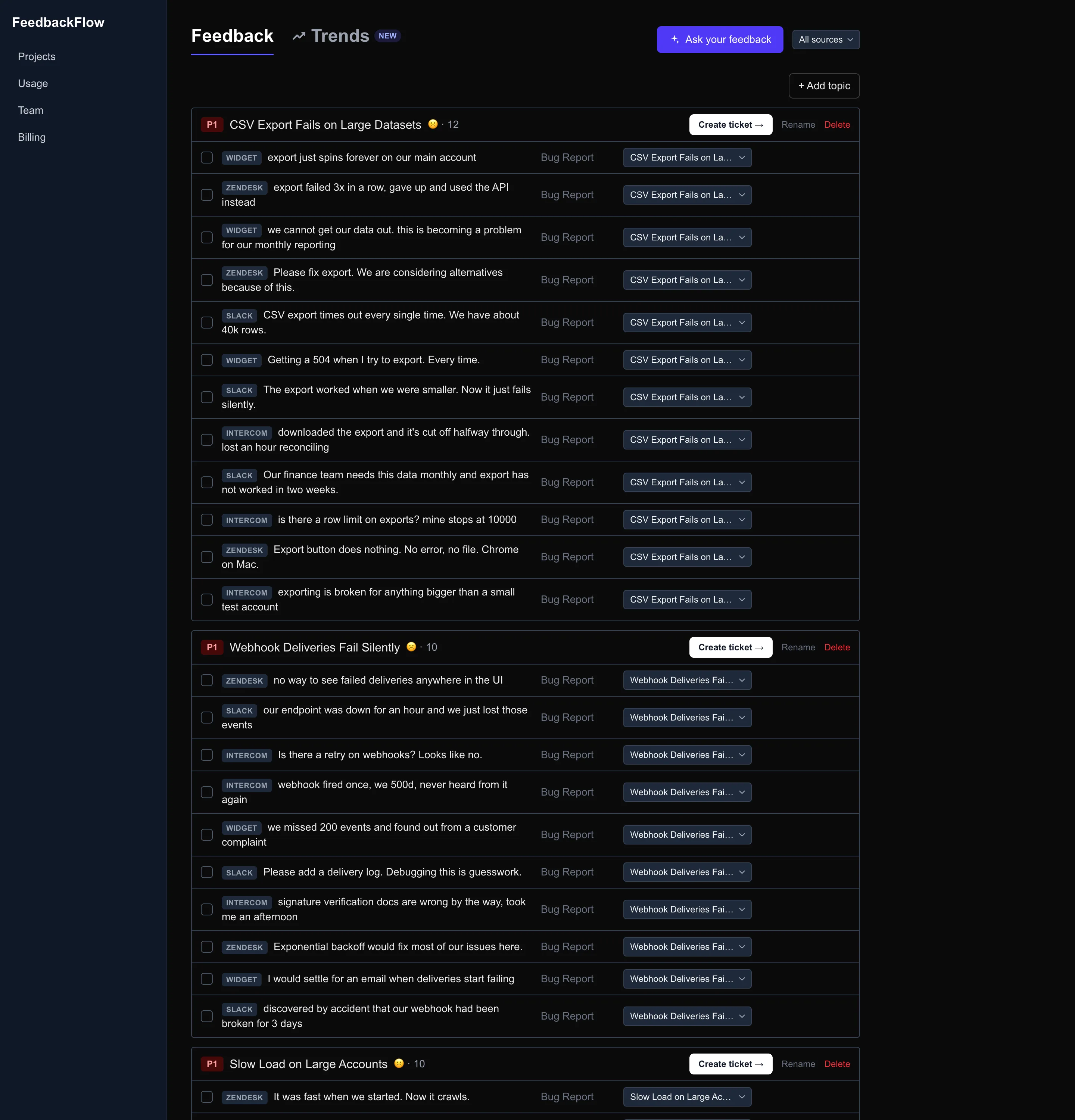
500 pieces of feedback. 40 real problems. One ranked list.
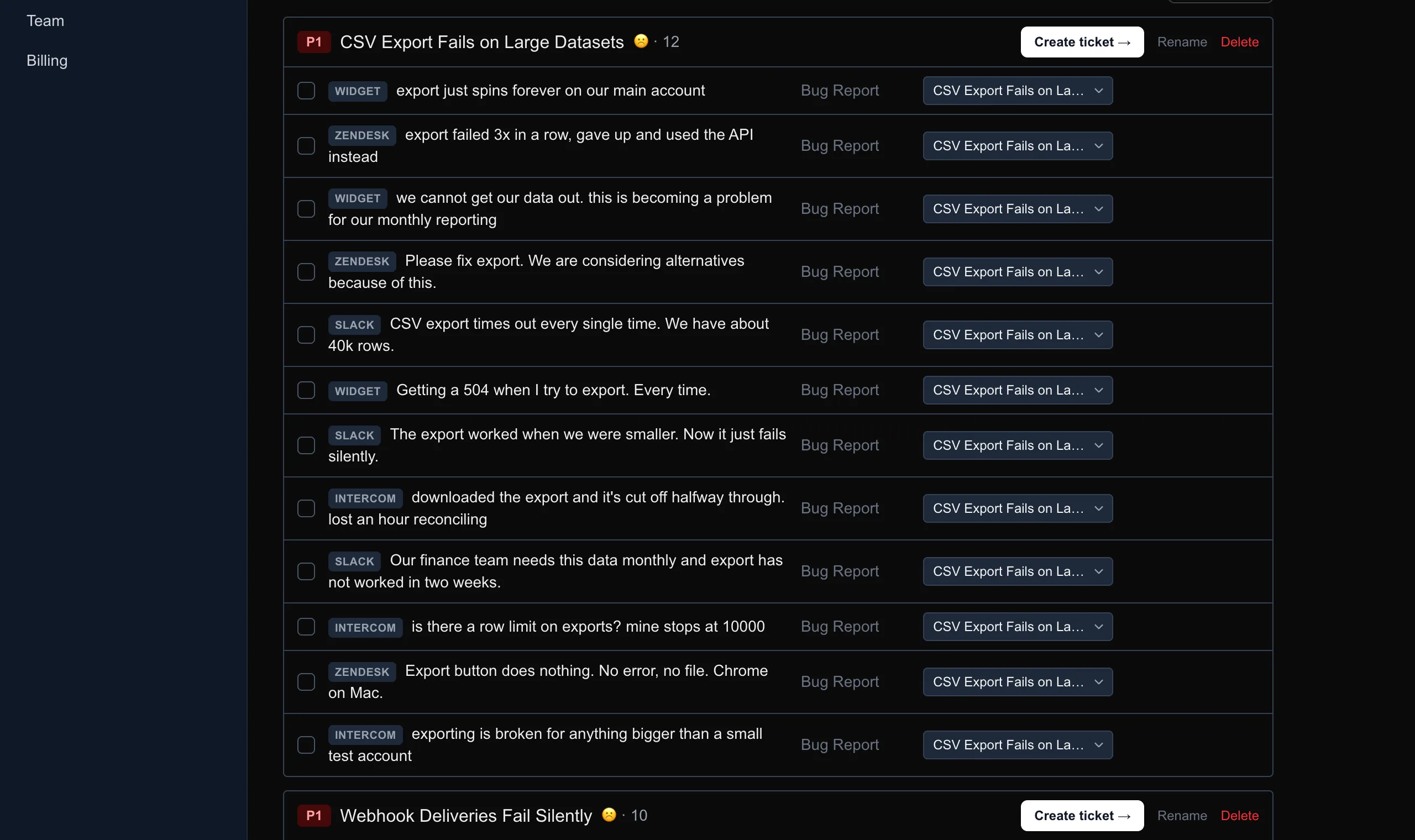
Twelve people report the same bug. You get one ticket, not twelve.
Free plan. No credit card. Live in 2 minutes.
Raw feedback
Ranked, ticket-ready
12 → 1
Duplicate reports merged into one topic before they reach your tracker
1 ranked list out
Ranked by impact, not by who shouted loudest
Tickets in seconds
Drafted and filed to Jira or Linear
How it works
Follow one note from your user's screen to the top of your roadmap.
Captured
in your widget
Share feedback
Prioritized by AI
grouped into topics, ranked
Topics ranked by priority, highest impact first
Filed automatically
in Jira or Linear
Export button unresponsive on mobile reports page
Users on mobile can't export reports. The export button has no effect.
Twelve reports. One topic.
A feedback widget that looks like your product, not ours
Describe the widget you want and it is drafted for you, starting from the colours already on your site. Publish in a click. No CSS, no redeploy, and the install snippet never changes again.
Teal, square, bottom left
"match our teal brand, square corners, put it bottom left"
Dark, understated
"dark panel, understated, keep it out of the way"
Editorial, high contrast
"high contrast, serif, big and confident"
A small product, built in the open
11 updates
shipped since June 2026, most recently “Design your widget by describing it”. Read the changelog.
I built FeedbackFlow because the triage step never scales. Reading 500 notes to find the 40 real problems is the work, and it is the work that quietly stops happening once a product has users.
It is early, and there are things it does not do: there is no public voting board, no roadmap page for your users, and no enterprise checklist. If that is what you need, a feedback board is a better fit and I will say so. What it does do is read every note, merge the duplicates, and hand your tracker a ranked list.
Email me directly at info@usefeedbackflow.com. It reaches a person, usually the same day.
Zoran · Founder, FeedbackFlow
The feedback button in the corner of this page is FeedbackFlow. Send something and it lands in our own project, gets triaged by the same AI described above, and reaches our tracker. That is the whole demo.
What you get on day one
Capture everywhere
Collect from your widget, Slack, Intercom, and Zendesk. Every channel your customers use, in one place.
AI prioritization
Feedback is auto-grouped into topics and ranked by priority, so you always know what to build next.
Jira & Linear
Turn any topic into a ticket in the tools you already use, with title, summary, and acceptance criteria drafted by AI.
Correct it once. It learns.
Change a topic or a priority in the review queue and the correction is kept as an example and fed back into triage, so the tenth correction of a kind is never needed.
Every source your customers use
Bring feedback in from wherever it happens: your widget, Slack, and support tools. Let AI turn it into ranked, ticket-ready work.
Sources
Trackers
Most feedback tools only capture their own widget. FeedbackFlow also reads your support conversations, so nothing your customers say gets lost.
Explore all integrationsAsk your feedback, get cited answers
Query your whole corpus in plain English: "What are enterprise users unhappy about this month?" FeedbackFlow reads every note and answers the way an analyst would if they had read all of it, with citations back to the exact feedback behind every claim.
- Grounded in your data. Answers come only from your feedback, never invented.
- Every claim is cited. Trace each answer back to the exact notes it came from.
- Ask follow-ups. It keeps the thread, so you can dig in like a conversation.
What are enterprise users unhappy about this month?
Two themes dominate: onboarding friction right after signup[1], and repeated mobile login failures[2].
[1] "I got lost right after signup, no idea what to do next."
[2] "Login keeps failing on mobile Safari, really frustrating."
What changed
See what's trending before it's a fire
FeedbackFlow tracks every topic's volume and sentiment over time, then surfaces what changed: a sudden spike, a brand-new theme, a sentiment slide. The insight layer that turns a pile of feedback into a read on what matters right now.
- Volume and sentiment over time. Per-topic trends, not just a static list.
- Spike and emerging-topic alerts. Catch a surge the week it starts, not months later.
- One glance at what moved. A plain-English summary of the biggest shifts.
Context comes attached, so you know who asked
Widget submissions capture the browser, OS, and page automatically, and every piece of feedback carries requester identity. Reproduce issues without a back-and-forth, and follow up with the exact people who asked when it ships.
- Automatic technical context. Browser, OS, and page captured on every widget note.
- Know who asked. Requester identity rides along, resolved from your widget, Intercom, and Zendesk.
- Close the loop. Tell the right customer the moment their request ships.
"The editor freezes when I paste a large table."
- Browser
- Chrome 128
- OS
- macOS 15
- Page
- /editor
Live in 2 minutes
Drop one script tag into your site and you are collecting feedback. Set the accent, theme, and position, or keep the defaults.
<script src="https://usefeedbackflow.com/widget.min.js"
  data-api-key="YOUR_API_KEY"
defer></script>This feedback button is FeedbackFlow. Try it: the widget in the corner is running live on this site.
Simple pricing. Two plans and a conversation.
Start free forever. Upgrade to Pro for $39 a month when you outgrow it, or $19 a month locked for life on the founding price, while it is still open.
Free
Everything you need to start collecting feedback.
Free forever
- 1 project
- 100 feedback items / mo
- In-app widget, styled to match your site
- Basic AI triage
Pro
For growing teams that live in their feedback.
$39 /mo
- 5 projects
- 2,000 feedback items / mo
- Slack, Intercom, and Zendesk
- Full AI triage
Business
Scale, security, and support for larger orgs.
Custom
- Unlimited projects
- Custom feedback volume
- All integrations plus custom
- Full AI triage
Frequently asked questions
- What is FeedbackFlow?
- FeedbackFlow collects customer feedback from your in-app widget, Slack, Intercom, and Zendesk, then uses AI to group it into topics, merge duplicates, score sentiment, and rank it by priority. You can ask questions about it, track trends, and file any topic to Jira or Linear as a ticket in one click.
- How is it different from Canny or a feedback board?
- A board asks your users to do the triage: post, vote, and merge in public. FeedbackFlow does the triage for you with AI and files ranked tickets into the tracker you already use. It has no public voting board by design. If you specifically want a public roadmap, a board is the better fit.
- Which sources can it collect from?
- An in-app widget you install with one script tag, plus Slack channels and Intercom and Zendesk conversations. Everything lands in one place and is triaged together.
- How does the AI triage work?
- As feedback arrives it is grouped into topics, checked for duplicates and merged, scored for sentiment, and ranked by priority. Correct a topic or a priority in the review queue and the correction is kept as an example and fed back into triage, so you do not correct the same kind of mistake twice.
- Is there a free plan?
- Yes, free forever with no credit card: one project, the in-app widget, basic AI triage, and Jira or Linear sync. Pro is $39 a month when you outgrow it, and there is a founding price of $19 a month, locked for life, while it lasts.
- How long does setup take?
- A couple of minutes. Add one script tag for the widget, connect Jira or Linear, and you are collecting and triaging feedback. There is no rollout project.
Start triaging feedback today
Built for founders and small product teams: a feedback loop that runs without a PM to maintain it.
Start freeFree plan. No credit card. Live in 2 minutes.